
Online Safety
Protect yourself from fraud
One of the best ways to protect your account is to set up two-step verification on your Force Broadband and non-Force accounts. This extra security step helps keep your accounts safe, even if someone gets your password.
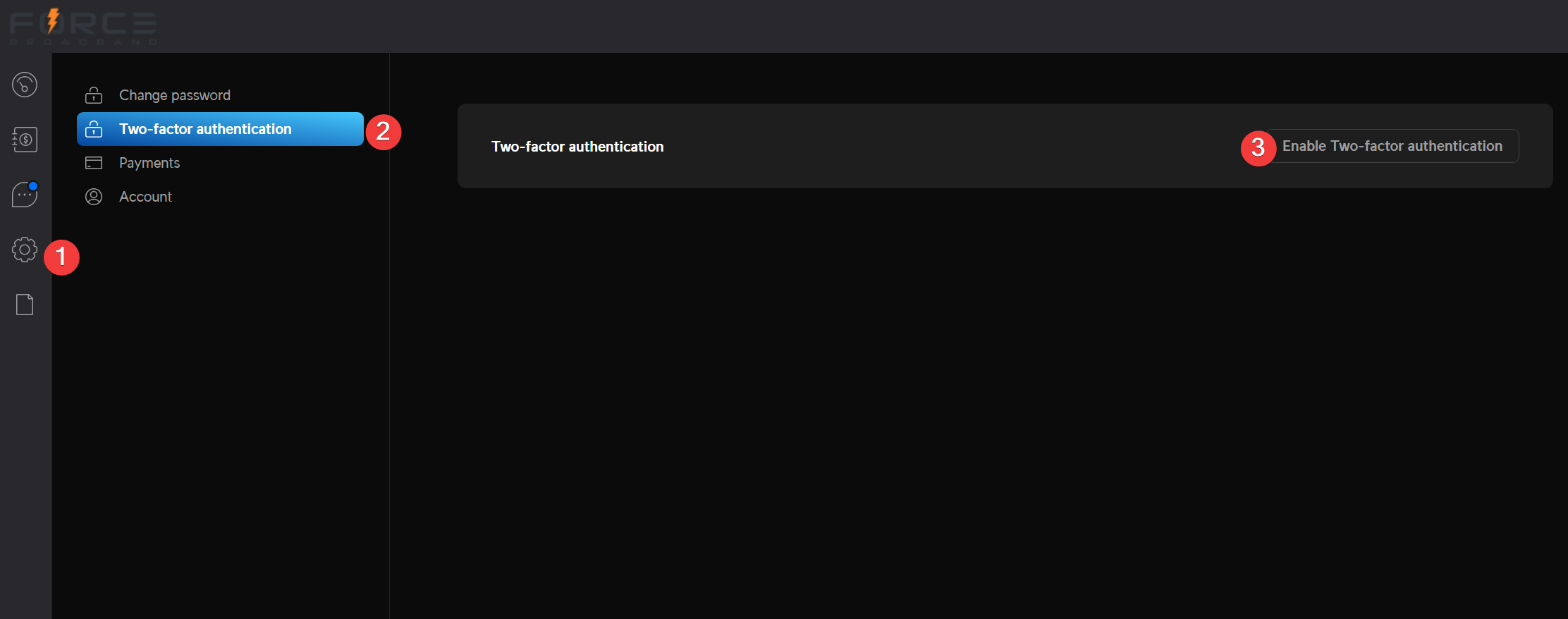
You can set up & enable two-factor authentication by logging into the client portal and
1. selecting the “Settings” cogwheel,
2. selecting the “Two-factor authentication” menu option, and
3. following the prompts that come after you select the “Enable Two-factor authentication” button.
Common fraud techniques
Bad actors may also try to pretend they are Force Broadband representatives or create fake websites to steal your personal information. Watch for these potential threats:
Fake payment requests
Force Broadband will not ask you to pay using a specific payment method such as merchant gift cards, wire transfer, PayPal, Venmo, or Zelle®. We are only set up to accept payment via a debit or credit card in our client portal.
If you get an unexpected call, text, or email asking you to pay your bill, check your account balance first.
Then make a payment directly through clients.forcebb.com
Force Broadband representatives will never ask for your username and password over the phone.
Bad actors may have access to personal information such as address, account number, balance due, and even last payment amount on your Force Broadband bill.
If something seems suspicious, stop the conversation and contact Force Broadband directly via a ticket on the client portal or at 719.896.2120 to verify the request. Force Broadband’s support team is completely understanding about getting hung-up on if a neighbor on our network is being cautious and wishes to verify the call.
Before entering payment using a link in an email, make sure the webpage is secure by clicking the lock symbol in the address bar.
Deceptive emails, phone calls, and text messages
Bad actors may use phone numbers that look like they belong to Force Broadband or rely on you calling the wrong number to try to:
Get account or payment information.
Convince you to place an order for them on your account.
Ask you to ship them a device or other package from Force Broadband.
If you are unsure whether the person on the line is an authorized Force Broadband representative, hang up and call 719.896.2120
Force Broadband carefully reviews its emails, websites, and text messages to help make sure the information shared with you is accurate and trustworthy. Be cautious if you notice signs that a message may not be legitimate, such as:
Spelling or grammar mistakes.
Blurry or low-quality images and logos.
Incorrect links or website addresses.
Other unusual errors or inconsistencies.
If the communication looks suspicious, you should delete the message, leave the website, and contact Force Broadband directly through an official channel to verify its authenticity.
Always check the sender’s email address.
If the email claims to be from Force Broadband, but comes from an email address you do not recognize, don’t trust it.
Never open links or attachments in unexpected emails or text messages.
They may use a disguised program such as malware, adware, spyware, or viruses that can damage or steal your data.
Scammers may make emails and text messages look like they came from Force Broadband. To confirm a message is real, check that the sender’s address ends in @forcebb.com.
Misleading websites
Some bad actors create website addresses that look like Force Broadband.
These websites may use small spelling mistakes or extra characters to trick you into visiting them by accident.
Once on these fake websites, you may be asked to make payments, provide account information, or download software that could harm your device or steal personal information.
These fake websites may look very similar to the Force Broadband website or the website of a trusted Force Broadband partner.
They may ask you to sign in, update your account information, or confirm personal details.
Always double-check that the web address you’ve typed into your address bar is correct.
The correct address for Force Broadband is www.forcebb.com
Phishing email or phishing text message
Scammers may try to make emails or text messages look like they are from Force Broadband. Here are some warning signs to watch for:
Messages that create a sense of urgency, such as “Your account will be deleted” or “Immediate action required”.
Misspelled website or email addresses that do not end in “forcebb.com”.
Requests for personal information such as your password, Social Security number (SSN), or payment details.
Unexpected attachments or links, especially if you were not expecting a message from Force Broadband.
Requests for payment using gift cards. Force Broadband does not accept payments with gift cards from another company, including Google, iTunes, Xbox, PlayStation, Target, Walmart, PayPal, Venmo, or Zelle.
Scammers may try to trick users into sharing personal information. Watch for:
Phishing emails and text alerts that pretend to be from Force Broadband, asking you to “verify your account” or “accept new terms.
Unsolicited emails that have attachments that you are told to “click on” or download.
Social media messages from users that claim to be Force Broadband employees.
Embedded QR codes or links in emails and text messages that claim to have important account information or updates.
These scams can help someone steal your identity, get into your email account, and see your personal information.
Report fraud
If you think you have been targeted by a scam, fraud, or dishonest business practice, report it at reportfraud.ftc.gov. The Federal Trade Commission (FTC) also provides helpful tips and scam alerts on its Consumer Advice website.